Improving Generated Code with copilot-instructions.md and AGENTS.md (GitHub Copilot)
My approach to improving code quality when using AI coding assistants through the use of copilot-instructions.md and AGENTS.md files.
12/29/2025
•7 min readTools
I use VSCode as my IDE and utilize the GitHub Copilot plugin there. The approaches and files described here primarily refer to GitHub Copilot.
As described in previous posts, I've started using AI coding assistants like GitHub Copilot and Vibe Coding intensively. In doing so, I've found that the quality of generated code heavily depends on how I provide context to these tools. Of course, it plays an important role how I formulate my prompts, but also the provision of additional context files that are relevant to completing the task. Furthermore, I want the generated code to fit my codebase and software architecture. Writing this information every time or mentioning it in the prompt is very time-consuming and error-prone (since it's easy to forget).
To solve this problem, I've started using two special files in my projects: copilot-instructions.md and AGENTS.md. These files contain important information and instructions that help AI coding assistants better understand the context and generate high-quality code that fits the project.
I'd like to introduce these two files to you so that you too can get generated code that better fits your projects and spend less time on corrections.
What is copilot-instructions.md?
The copilot-instruction is a Markdown file that gives GitHub Copilot (Chat and Inline) project-specific custom instructions, such as coding guidelines, architecture rules, preferred libraries, and testing strategies.
It's typically placed under .github/copilot-instructions.md in the project and automatically loaded as context for Copilot in this project.
When this file is present in the project, Copilot reads its content and uses it as additional context for every request you make to Copilot. You can tell if your created copilot-instructions.md file is being used by this information in the chat:

If this doesn't appear, you can activate the file via the gear icon in the chat window through the "Chat Instructions" menu.
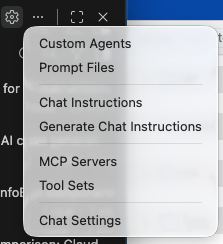 Then you need to select the appropriate file.
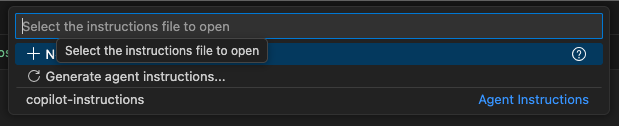
The file starts with a header section that provides metadata. Here you can set the name, a description, and applyTo. The latter is optional, but if set, it specifies which files the instructions should automatically apply to, relative to the workspace root directory. Use ** to apply to all files.
Next in the Markdown file follows a description of what the assistant's core task is in this project. The next paragraph is the project context, such as the framework, language, build tooling, etc. This is followed by the coding guidelines, i.e., how the code should look, which patterns and libraries should be used (preferably with concrete examples). You can also specify how the development process should look, and of course also other guidelines and general patterns that should be adhered to.
The more specific and concrete you provide this information for your project, the better the generated code will fit your project.
To make it easier for you to get started, there's the awesome-copilot repo on GitHub with suitable instructions, for example, a Vue3 copilot-instruction
Feel free to try it out and see if you can improve the quality of the generated code this way.
What is AGENTS.md?
Similar to the copilot-instructions.md file, AGENTS.md is an open format/standard file at the project root ("README for AI Agents") that can be read by multiple tools (Copilot Agent, Cursor, Zed, OpenAI/Codeium-like Agents, etc.).
It primarily describes how an "Agent" should work in this repo: project context, build/test commands, roles (e.g., "Refactorer", "Test Writer"), workflow rules, and quality requirements.
Typical contents of an AGENTS.md file are contents that help an agent work effectively with your project. Popular options:
- Project overview
- Build and test commands
- Code style guidelines
- Testing instructions
- Security considerations
Here's a simple example of an AGENTS.md file:
# Sample AGENTS.md file

## Dev environment tips
- Use `pnpm dlx turbo run where <project_name>` to jump to a package instead of scanning with `ls`.
- Run `pnpm install --filter <project_name>` to add the package to your workspace so Vite, ESLint, and TypeScript can see it.
- Use `pnpm create vite@latest <project_name> -- --template react-ts` to spin up a new React + Vite package with TypeScript checks ready.
- Check the name field inside each package's package.json to confirm the right name—skip the top-level one.

## Testing instructions
- Find the CI plan in the .github/workflows folder.
- Run `pnpm turbo run test --filter <project_name>` to run every check defined for that package.
- From the package root you can just call `pnpm test`. The commit should pass all tests before you merge.
- To focus on one step, add the Vitest pattern: `pnpm vitest run -t "<test name>"`.
- Fix any test or type errors until the whole suite is green.
- After moving files or changing imports, run `pnpm lint --filter <project_name>` to be sure ESLint and TypeScript rules still pass.
- Add or update tests for the code you change, even if nobody asked.

## PR instructions
- Title format: [<project_name>] <Title>
- Always run `pnpm lint` and `pnpm test` before committing.
You can also find more examples at Agents.md. Here's another example of an AGENTS.md from the aforementioned awesome-copilot repo.
Comparing copilot-instructions.md vs. AGENTS.md
Both files serve the purpose of providing AI coding assistants with contextual information to improve the quality of generated code. However, there are some differences in their focus and application. Whether you use only one of the two files or combine both is up to you. The important thing is that the files don't contradict each other but rather complement each other.
Here's a brief overview of the differences:
| Aspect | copilot-instructions.md | AGENTS.md |
|---|---|---|
| Target Tool | Specifically GitHub Copilot | Generic standard for many coding agents |
| Typical Position | .github/copilot-instructions.md | AGENTS.md in repo root (+ possibly subfolders) |
| Focus | Fine-tuning Copilot's behavior | Project/Agent manifest, workflow & roles |
| Scope | Only Copilot reads it | Multiple IDEs/Agents can read it |
| Content Focus | Coding style, patterns, guidelines | Project context, builds/tests, tasks/roles |
| Standardization | Copilot feature from GitHub | Open, growing community standard |
Outlook
In this post, I've only introduced the basics of copilot-instructions.md and AGENTS.md. There's also the possibility of using multiple instruction files in a project to provide different contexts for different modules or areas. The use of custom agents is also possible. I'll write more about this in a future post.
Conclusion
I myself have been able to significantly improve the quality of generated code through the use of both files. By giving AI coding assistants clearer instructions and context, I get code that better fits my projects and requires less rework. I can only recommend to everyone who uses AI coding assistants to use these files in their projects and thus improve the topic of "Context Engineering".
Even if you get better code generated through the use of these files, you should still review and test the generated code to ensure it meets both your quality standards and your requirements.